
TEAMS-Designer® 26.3 Is A Go!
October 02, 2026
Comments are off

Advanced Analysis Enhancements, Modernized TMSX Workflows, and Improved Reporting
Qualtech Systems, Inc. is pleased to announce the release of TEAMS-Designer® 26.3. This release expands TEAMS-Designer’s diagnostic and fault-analysis capabilities with significant enhancements to DFT, Testability and Serviceability Analysis, Fault Impact Propagation, model reporting, and TMSX model management. It also delivers a collection of stability improvements, bug fixes, and third-party library updates across the platform.
TEAMS-Designer 26.3 focuses on helping engineers better understand how faults propagate through complex systems, improving the accuracy of diagnostic analyses, increasing model traceability, and simplifying collaboration through a modernized TMSX workflow. With clearer analysis results, enhanced reporting, and more reliable model interchange, this release provides meaningful improvements for both model developers and analysis practitioners.
What’s New in TEAMS-Designer 26.3
DFT Enhancements
TEAMS-Designer 26.3 expands support for Inputs as Failure Sources and introduces several improvements that increase the fidelity of DFT analysis. New capabilities include hierarchy-level configuration options, improved AND Node handling, and more informative diagnostic visualizations.
A key enhancement is improved visibility into diagnostic coverage. DFT output now clearly distinguishes fault paths that successfully reach a test from those that terminate before detection. This additional context helps engineers understand why certain failures remain unobservable and supports more effective fault isolation and model refinement efforts.
Expanded Testability and Serviceability Analysis
Testability and Serviceability Analysis have been extended to support Inputs as Failure Sources and Output Ports as Tests at both the Module Depth and Module Hierarchy Label levels.
In addition, analysis results are now presented through new Report Panes within TEAMS-Designer, providing a more integrated workflow for reviewing and navigating generated results. This enhancement makes it easier to move between modeling activities and analysis review without leaving the design environment.
TMSX Format Modernization
TEAMS-Designer 26.3 introduces significant improvements to the TMSX model format designed to improve model consistency, traceability, and collaboration. Enhancements include improved identifier management, more consistent organization of model data, enhanced handling of technology labels, and greater reliability when exporting and reloading TMSX models.
These improvements help produce cleaner revision histories, simplify configuration management activities, and improve the exchange of models between TEAMS environments. Organizations using TMSX as part of larger engineering workflows will benefit from more predictable model lifecycle management and improved interoperability.
Analysis Configuration Reporting
TEAMS-Designer 26.3 adds a new Analysis Configuration Report that documents the analysis options used when generating reports. The report is available for Testability, Serviceability, Static Analysis, and Consolidated Reports.
By capturing analysis settings alongside analysis results, users gain improved traceability, repeatability, and reviewability. This enhancement helps teams better understand how results were generated and supports verification activities throughout the engineering process.
Fault Impact Propagation
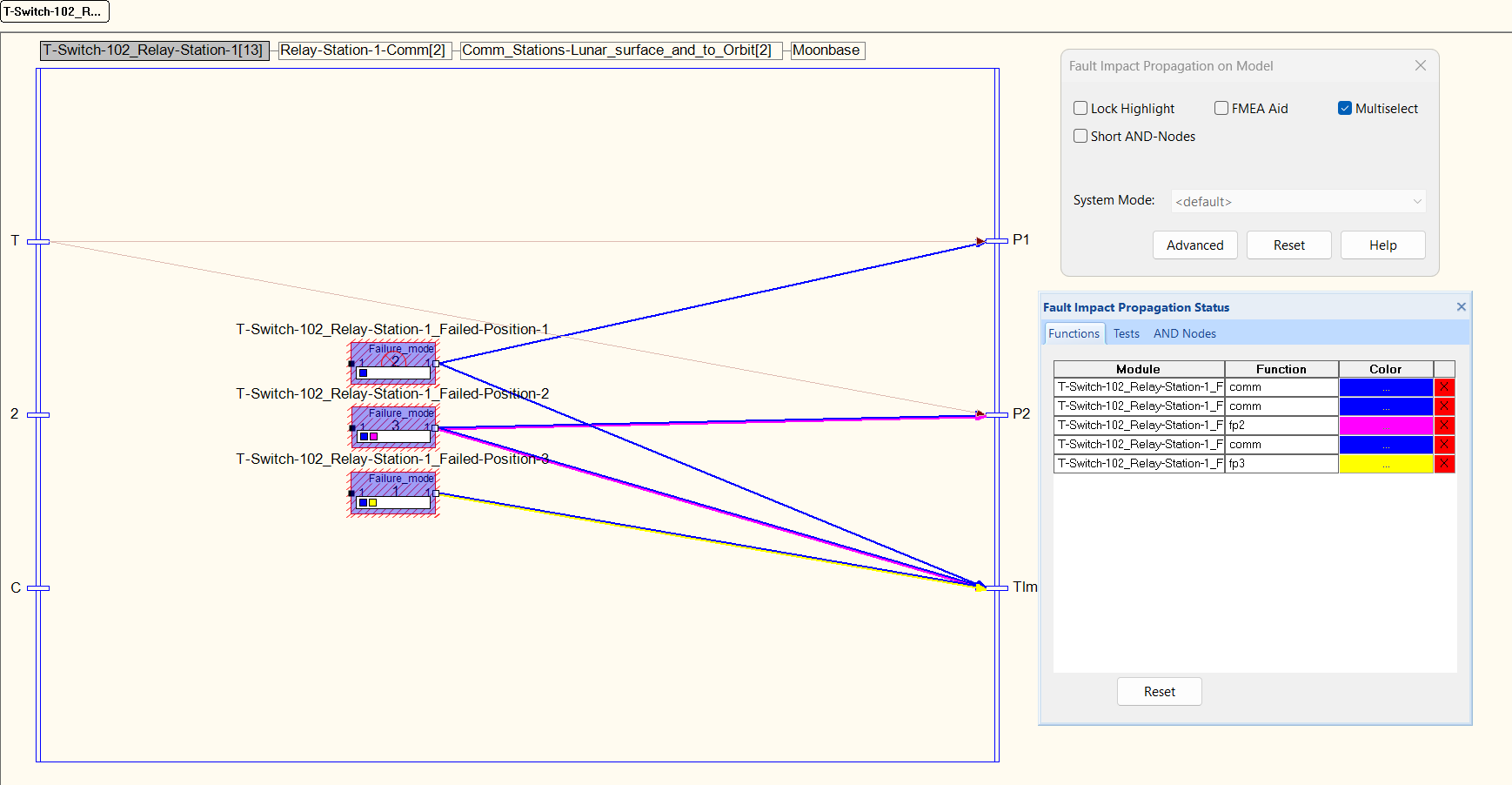
TEAMS-Designer 26.3 introduces a significantly enhanced Fault Impact Propagation capability that provides a more accurate representation of faults and their downstream effects throughout a system.
The updated analysis improves the handling of function state, failover behavior, AND Node propagation margins, and downstream effect visualization. These enhancements help users better understand system behavior under fault conditions and more effectively evaluate the operational consequences of failures.
Model Validation Improvements
Duplicate Module Labels are now identified within the Model Inconsistency Report, making it easier to detect and correct modeling issues before they affect downstream analyses.
Additionally, fault-inserted DFT generation now correctly produces cut sets from inserted fault trees, improving the accuracy and consistency of related analysis workflows.
Third-Party Library Updates
TEAMS-Designer 26.3 includes a refresh of multiple third-party dependencies to maintain platform security, compatibility, and long-term supportability. Updates include:
- WebView2 1.0.4191.47
- C++/WinRT 3.0.260818.1
- curl 8.22.0
- eXpat 2.8.4
- json-c 0.19
- Liquid Studio 21.4.1.14714
- OpenSSL 4.0.2
These updates help ensure TEAMS-Designer remains aligned with current platform technologies and supported dependency versions.
Stability Improvements and Bug Fixes
TEAMS-Designer 26.3 includes a series of fixes across model loading, analysis generation, reporting, TMSX workflows, and user interface behavior.
Highlights include:
- Improved compatibility when loading older legacy models.
- Resolved issues opening generated output files on certain network-drive environments.
- Corrected unexpected Model Tree behavior following analysis execution and Edit/Navigate mode changes.
- Fault Tree and Cut Set reports now correctly respect selected System and Switch Modes.
- Resolved TMSX re-import issues involving missing Test Points.
- Function Editor grid improvements when creating new functions.
- Corrected a Testability Analysis crash when Diagnostic Tree generation is disabled.
Together, these updates improve reliability, correctness, and usability across key TEAMS-Designer workflows.
Looking Ahead
TEAMS-Designer 26.3 continues Qualtech Systems’ investment in improving diagnostic modeling, fault analysis, and model lifecycle management. With enhanced DFT capabilities, expanded Testability and Serviceability Analysis, modernized TMSX workflows, improved reporting, and more accurate Fault Impact Propagation, this release delivers meaningful advancements for engineers working with complex systems.
We encourage customers to upgrade to TEAMS-Designer 26.3 and take advantage of the latest analysis enhancements, reporting improvements, platform updates, and stability fixes.
TEAMS-RDS® & TEAMATE® 26.3 Has Launched!
October 02, 2026
Comments are off

We’re excited to announce the release of TEAMS-RDS® & TEAMATE® 26.3, delivering major platform modernization updates, expanded Linux support, and enhancements that strengthen performance, security, and reliability across the product suite.
This release lays the groundwork for future innovation by upgrading core platform technologies while continuing our commitment to providing a secure and dependable environment for model-based diagnostics, troubleshooting, and training.
A Modernized Foundation: Java 25 & Tomcat 11
One of the most significant updates in this release is the migration of TEAMS-RDS to Java 25 and Tomcat 11 across both Windows and Linux deployments. This modernization effort brings substantial improvements in performance, scalability, and security.
Customers can expect:
- Faster application responsiveness
- Improved server-side performance
- Enhanced security posture
- A modern foundation for future platform capabilities
By moving to the latest enterprise-grade Java and Tomcat technologies, TEAMS-RDS is better positioned to take advantage of new platform innovations while maintaining the reliability our customers expect.
Ubuntu 26 Support Across the Full Linux Stack
Organizations deploying TEAMS-RDS in Linux environments can now take advantage of full Ubuntu 26 support.
All major platform capabilities, including:
- Guided Troubleshooting
- Training Center
- IoT Sim
- Administrative Services
- Supporting platform components
have been validated and supported on Ubuntu 26, enabling customers to adopt the latest Ubuntu release while maintaining operational continuity and compatibility.
Stronger Security Through Updated Dependencies
Security remains a top priority for every TEAMS-RDS release.
Version 26.3 includes updates to native C/C++ and Java-based third-party libraries, ensuring the platform continues to benefit from the latest security patches, performance improvements, and vendor-supported releases.
These updates help protect deployments against known vulnerabilities and active exploits while reducing operational risk.
Reliability & Usability Improvements
In addition to platform enhancements, TEAMS-RDS 26.3 addresses several issues reported by customers and internal teams, including:
Administration Improvements
- Corrected navigation bar sizing issues within the Audit Employee Authentication interface.
- Resolved a submission issue when adding scheduled tasks through the System Health Status page.
- Fixed company management behavior that could prevent deletion of newly added companies.
Training & Content Management Enhancements
- Improved Moodle training package export functionality for smoother integration with learning environments.
Together, these fixes improve day-to-day usability and help administrators manage TEAMS-RDS environments more efficiently.
Looking Ahead
The 26.3 release represents more than a routine update. By modernizing the underlying platform infrastructure with Java 25 and Tomcat 11, expanding Linux support to Ubuntu 26, and continuing our focus on security and maintainability, we’ve established a strong foundation for the next generation of TEAMS-RDS and TEAMATE capabilities.
We encourage all customers to upgrade to the latest version to take advantage of these improvements.
For questions regarding upgrading, deployment, or licensing, contact the Qualtech Systems support team at su*****@*****si.com.
What’s New in 26.3 at a Glance
✅ Java 25 support
✅ Tomcat 11 support
✅ Improved performance and security
✅ Full Ubuntu 26 platform support
✅ Updated third-party libraries
✅ Administrative usability fixes
✅ Moodle training package export improvements
TEAMS-RDS® & TEAMATE® 26.2 Are Here
June 30, 2026
Comments are off
Team QSI is proud to announce the release of TEAMS-RDS® 26.2 and TEAMATE® 26.2.
This release continues our focus on stability, usability, and keeping core platform dependencies current. TEAMS-RDS 26.2 includes several improvements to the Training Center experience, along with Model Viewer refinements and third-party library updates. TEAMATE 26.2 also includes updated third-party libraries to help keep deployments current and secure.
TEAMS-RDS 26.2
TEAMS-RDS 26.2 includes a broad set of Training Center improvements focused on clarity, navigation, scoring, and overall user experience.
Training Center updates include clearer Test Coverage behavior, improved alignment between session steps and the Diagnostic Tree, corrected score calculation behavior, and refinements to the test selection feedback process. Several usability issues were also addressed, including navigation through Test Coverage, Question History behavior, spacing in the test selection interface, and help text corrections.
This release also improves behavior around the Model Viewer. Cache-related issues have been corrected, and the Model Viewer now handles cases more gracefully when runtimegen is not installed.
To further streamline Training Center workflows, Required Resources and Restore System Setup Status pages are no longer displayed.
TEAMATE 26.2
TEAMATE 26.2 focuses on keeping the application current with updated third-party libraries.
Native C/C++ and Java dependencies have been updated to their latest versions, supporting continued security, compatibility, and maintainability across TEAMATE deployments.
Third-Party Library Updates
On the security and maintenance side of things, third-party dependencies have been updated for both TEAMS-RDS and TEAMATE.
These updates help keep supported installations current and reduce exposure to known issues in older dependency versions.
See the third-party library report of TEAMS-RDS & TEAMATE for more details.
Signing off till next release!
TEAMS-Designer® 26.2 Released
June 30, 2026
Comments are off
Improved DFT Visibility, Streamlined Editing, and Continued Stability Enhancements
Qualtech Systems, Inc. is pleased to announce the release of TEAMS-Designer® 26.2. This release continues the progress made throughout version 26 by improving diagnostic modeling workflows, refining editor usability, strengthening model review capabilities, and delivering important dependency updates and stability fixes.
TEAMS-Designer 26.2 focuses on making core modeling and analysis tasks clearer and more efficient. With improved DFT fault propagation visibility, revamped Function and Function Group editing, expanded response modeling support, and a broad set of corrections across reports, dialogs, importing, editing, and analysis workflows, this release helps users work more confidently with complex system models.
What’s New in TEAMS-Designer 26.2
Improved DFT Fault Propagation Visibility
TEAMS-Designer 26.2 improves the DFT experience by showing fault propagation paths up to unbreeched AND nodes and disconnected switches.
In previous versions, TEAMS-Designer displayed complete fault paths to a test. With this release, Designer can now display partial paths when propagation is blocked by an AND node or switch. This gives engineers better insight into where and why propagation stops, making it easier to understand model behavior and investigate diagnostic coverage.
For users working through complex DFT scenarios, this added visibility supports faster model review and more informed troubleshooting of propagation paths.
Revamped Function and Function Group Editing
The Function Editor and Function Group Editor have been combined and enhanced for improved usability.
By bringing these workflows together, TEAMS-Designer 26.2 provides a more straightforward editing experience for users managing functions and function groups. This helps reduce context switching, simplifies common editing tasks, and makes function management more approachable within day-to-day modeling activities.
Improved Duplicate Module Label Visibility
TEAMS-Designer 26.2 improves duplicate visibility for module labels in the Batch Model Editor.
This enhancement helps users identify repeated or conflicting labels more easily while working with larger sets of model data. Better visibility into duplicate labels supports cleaner models, easier review, and more efficient correction of potential data-entry issues.
Latent Failure Analysis in Response Path Editing
For users performing Response Modeling, Latent Failure Analysis is now available in the Response Path Editor.
This enhancement extends response modeling workflows by making latent failure analysis more accessible within the context where response paths are reviewed and edited. It helps users better evaluate how latent failures may affect modeled response behavior and system-level outcomes.
Continued Third-Party Library Updates
TEAMS-Designer 26.2 also includes updated third-party dependencies to keep the platform current. Updates include:
- OpenSSL updated to version 4.0.1
- eXpat updated to version 2.8.1
- Liquid XML updated to version 21.4.0.14674
- curl updated to version 8.20.0
These updates support ongoing security, compatibility, and maintainability across the TEAMS-Designer platform.
See the third-party library report of TEAMS-Designer for more details.
Network and Removable Storage Warnings
TEAMS-Designer 26.2 now warns users when modeling from network drives or removable storage.
This added warning helps users avoid workflows that may introduce performance issues, file access problems, or unexpected behavior when working with active model files. By alerting users earlier, TEAMS-Designer helps encourage more reliable modeling practices.
Stability Improvements and Bug Fixes
TEAMS-Designer 26.2 includes a broad set of fixes across editing, reports, analysis, model import, DFT behavior, and user interface consistency.
Highlights include:
- TEAMS-Designer no longer crashes when cutting and pasting large numbers of modules and links
- Pasted components are no longer pushed together on the canvas
- The Model Inconsistency Report now properly sanitizes illegal characters
- Static analysis no longer produces indexing errors on certain models
- Rich Text Editors now respect the Windows 11 Theme
- Changes in the Tech Data section of the Batch Module Editor now persist correctly
- System MTTF in the Serviceability/Testability Report now aligns with values shown in Module Properties and the Batch Module Editor
- The Module Properties dialog remains accessible after generating FMECA reports
- MTTF Propagate Down behavior has been corrected in both the Batch Module Editor and Module Properties
- The Model Tree no longer incorrectly opens at the end of Serviceability/Testability Analysis
- Direct Tests no longer lose detections when imported from older model formats
Together, these fixes improve reliability, correctness, and usability across several important TEAMS-Designer workflows.
Looking Ahead
TEAMS-Designer 26.2 continues Qualtech Systems’ investment in making TEAMS-Designer more capable, more reliable, and easier to use for engineers developing and analyzing complex system models.
With clearer DFT propagation behavior, improved function editing, better model review tools, expanded response modeling support, and continued stability work, this release provides meaningful improvements for both everyday modeling and advanced analysis workflows.
We encourage customers to upgrade to TEAMS-Designer 26.2 and take advantage of the latest usability improvements, analysis enhancements, dependency updates, and bug fixes.
TEAMS-Designer® 26.1 Delivered
April 01, 2026
Comments are off
A Faster, More Streamlined Release for Analysis, Reporting, and Model Quality
Qualtech Systems, Inc. is pleased to announce the release of TEAMS-Designer® 26.1. This release builds on the modernization and usability improvements introduced in version 26, with a strong focus on faster analysis, expanded reporting, improved model review, and important third-party library updates.
TEAMS-Designer 26.1 delivers meaningful enhancements for engineers working with fault trees, cut sets, and function analysis, while also improving day-to-day usability across dialogs, reports, and editing workflows. Combined with a broad set of bug fixes and security-focused dependency updates, version 26.1 continues to strengthen the reliability and efficiency of the TEAMS-Designer experience.
What’s New in TEAMS-Designer 26
Faster Cut Set Generation
TEAMS-Designer 26.1 improves Cut Set generation performance, helping users analyze models more quickly and reduce turnaround time when working through complex fault scenarios.
For teams working with large or detailed models, this improvement supports a more responsive analysis workflow and gets results in front of engineers sooner.
Fault Tree Select Switch Modes
TEAMS-Designer 26.1 adds the ability to select Switch Modes during Fault Tree generation.
This enhancement gives users more control over how fault trees are generated and reviewed, helping align analysis results more closely with the intended system configuration and operating context.
New Fault-To-Function Report
A new Fault-To-Function (LOF) Report has been added under the Reports menu, giving users a more streamlined way to generate this information directly from the TEAMS-Designer interface.
By bringing this capability into the application, version 26.1 reduces reliance on command-line workflows and makes fault-to-function analysis more accessible within normal modeling activities.
Expanded AND Node Inconsistency Reporting
The Model Inconsistency Report now includes a new AND Node Inconsistency Report available through Reports → Model Inconsistency Report.
This report identifies all functions that reach every AND Node in the default system and switch configuration. It was added in response to a need for greater visibility into cases where functions do not propagate to all input ports of an AND Node, helping users detect and investigate model inconsistencies more effectively.
Improved Search and Usage Finder Workflows
TEAMS-Designer 26.1 includes several enhancements that improve everyday model exploration and editing:
- The “Search In” field in the Find dialog now retains the user’s last selection.
- Users can now identify Modules with no functions attached (General Failure) and Tests with no functions attached in the Usage Finder.
These improvements make it easier to continue focused search workflows and identify incomplete model definitions more efficiently.
Third Party Dependencies Updated
To help keep deployed environments safe from active exploits and aligned with current dependencies, TEAMS-Designer 26.1 updates several native C/C++ and Java third-party libraries, including:
- curl updated to version 8.19.0
- eXpat updated to version 2.7.5
- OpenSSL updated to version 3.6.1
- Liquid XML Data Binder updated to version 21.3.0.14470
These updates improve security posture while keeping the platform current.
See the third-party library report of TEAMS-Designer for more details.
Stability Improvements and Bug Fixes
TEAMS-Designer 26.1 also includes a broad range of fixes across reporting, dialogs, theming, imports, DFT workflows, and database interactions.
Highlights include:
- Function Propagation Reports now correctly respect Local Diagnostic Function Scope
- Resolved unexpected radio button behavior in the Windows 11 Theme
- Fixed lingering button highlight behavior in the DFT FMEA dialog
- Corrected an issue where functions marked as Effects could lose their typing after closing the Global Function Editor
- Resolved a Postgres primary key insertion error involving tests in test points
- Fixed a DFT crash when deselecting faults seeded with General Failure
- Corrected issues in older models where Direct Tests could lose detected modules
- Resolved cases where Receivers and Transmitters could lose association during model import
- Restored the missing toolbar gripper in the Windows 11 Theme
- Improved small-screen usability by fixing the Options dialog size
- Restored the missing header in the Batch Module Editor Grid
- Reorganized DFT FMEA fault selection for improved readability
- Fixed resizing issues in the Model Clean Up dialog
- Corrected layout behavior for the Reset button in the DFT Status Pane
- Resolved unexpected MTTF behavior when importing a module
- Corrected DFT Test Selection behavior with the Short AND Node option
- Users can now open the logfile after Export to XML
- Adjusted the New AND Node Properties dialog so margin is correctly defined as the number of inputs minus one
Together, these fixes improve correctness, polish, and usability across a wide range of core workflows.
Looking Ahead
TEAMS-Designer 26.1 continues the momentum established in version 26 by delivering faster analysis, stronger reporting capabilities, improved model review tools, and ongoing refinement of the user experience.
This release reflects Qualtech Systems’ continued investment in making TEAMS-Designer more capable, more efficient, and easier to use for engineers building and analyzing increasingly sophisticated system models.
We encourage customers to upgrade to TEAMS-Designer 26.1 and take advantage of the latest performance improvements, reporting enhancements, and stability updates.
TEAMS-RDS® & TEAMATE® 26.1 Awaits
April 01, 2026
Comments are off
Team QSI is proud to announce another TEAMS-RDS & TEAMATE release.
Windows Only: TEAMS-RDS Developer installer now prefers ODBC Driver 17 for SQL Server when creating an ODBC data source for TEAMS-Designer. ODBC Driver 17 for SQL Server is installed by SQL Server 2022 Express. Using this ODBC driver will ensure max compatibility with SQL Server 2022. If for some odd reason, ODBC Driver 17 for SQL Server is not found, installer will fall back to using OS provided SQL Server ODBC driver.
Windows Only: TEAMS-RDS installer more clearly states what will be missed when Python 3.14 is not installed. Dialog now puts everything in the context of IOT Sim, a web-based replacement for Sensor Agent, which depends upon Python 3.14 to function.
On the security side of things, third party dependencies have been updated.
- curl updated to version 8.19.0
- eXpat updated to version 2.7.5
- OpenSSL updated to version 3.6.1
- Liquid XML Data Binder updated to version 21.3.0.14470
- OpenJDK JRE (x64) updated to version 8.0.482.08
- Apache Tomcat updated to version 9.0.116
- OPTIONAL: Python updated to 3.14.3
- OPTIONAL: Node.js updated to 22.22.1
See the third-party library report of TEAMS-RDS & TEAMATE for more details.
Signing off till next release!
Say Hello to TEAMS-RDS® 26 & TEAMATE® 26
January 21, 2026
Comments are off
Team QSI is proud to announce another TEAMS-RDS & TEAMATE release.
Install Upgrade Support WiX-based Windows installer now supports upgrades. No longer do you need to un-install then install. Double click the new installer to get on your way with the latest version!
As for enhancements, SoftwareKey Protection Plus 5 licensing API usage has been optimized for today’s encryption. Encryption year after year is becoming stronger and stronger. Which means decryption is taking longer and longer. Updated the license routines to play nicer with the strength of the encryption.
On the security side of things, third party dependencies have been updated.
- curl updated to version 8.18.0
- eXpat updated to version 2.7.3
- OpenSSL updated to version 3.6.0
- SoftwareKey ProtectionPlus updated to version 5.25.4.0
See the third-party library report of TEAMS-RDS & TEAMATE for more details.
Signing off till next release!
Introducing TEAMS-Designer® 26
December 18, 2025
Comments are off
A Major Step Forward in Performance, Usability, and Modernization
Qualtech Systems, Inc. is pleased to announce the release of TEAMS-Designer® 26, a significant update that delivers a modernized user experience, major performance improvements, and enhanced installation flexibility—while continuing to strengthen the modeling and analysis capabilities relied upon by systems engineers worldwide.
This release represents a foundational investment in the future of TEAMS-Designer, combining long-requested usability enhancements with under-the-hood optimizations designed to scale with increasingly complex models.
What’s New in TEAMS-Designer 26
A Modernized Windows 11 Experience
TEAMS-Designer 26 introduces a new Windows 11–style user interface, offering a cleaner, more contemporary look and feel while maintaining continuity with existing workflows.
Key UI highlights include:
- A new Personalization dialog (View → Personalization) allowing users to switch between the Legacy View and the Windows 11 style
- Updated icons, controls, and menus with improved visual clarity and contrast
- Enhanced Dark Mode and Light Mode support
- Improved text spacing and font readability
- Stronger high-DPI and display-scaling support for modern monitors
Note: Fresh installations default to the Legacy View to ensure a smooth transition. Users may enable the Windows 11 style at any time in the Personalization dialog.
Faster, More Responsive Fault Trees
TEAMS-Designer 26 delivers substantial performance improvements for Fault Tree modeling, particularly for large and complex trees.
Enhancements include:
- Reduced Fault Tree file sizes through virtualization
- Significantly faster load times and smoother rendering
- Improved browser-side rendering to prevent slowdowns when expanding or collapsing nodes
- Intuitive click-and-drag panning and zooming, making navigation more fluid and responsive
These updates enable engineers to work more efficiently with large diagnostic and fault models without sacrificing interactivity.
New Effect Hierarchy Report
A new Effect Hierarchy Report is now available under Reports → Generate Effect Report, providing a clear, structured summary of all effects within a model. This report supports improved model review, validation, and communication across engineering teams.
Seamless Upgrade-in-Place Installation
For the first time, TEAMS-Designer now supports MSI upgrade-in-place installation. Users can upgrade existing installations directly to version 26.0 while preserving their current configuration and environment—eliminating the need for uninstall/reinstall cycles.
Stability Improvements and Bug Fixes
TEAMS-Designer 26.0 includes numerous stability and correctness fixes across diagnostics, fault trees, analyses, and property dialogs. Highlights include:
- Improved robustness when working with modules, sub-modules, and BIST properties
- Resolved crashes related to unnamed AND-nodes and DFT interactions
- Corrected behavior for Function Groups and Damage Assessment visibility
- Improved handling of analyses and tab management
These fixes contribute to a more reliable day-to-day modeling experience.
Third Party Dependencies Updated
- eXpat updated to version 2.7.3
- OpenSSL updated to version 3.6.0
- SoftwareKey ProtectionPlus updated to version 5.25.4.0
See the third-party library report of TEAMS-Designer for more details.
Important Notes and System Requirements
- All 32-bit versions and TEAMS-Designer versions 9.x through 11.x are now end-of-life and no longer supported
- TEAMS-Designer 26 requires a new license (licenses from 13.2 or earlier are not valid)
- Internet Explorer is no longer supported
- Installation paths and the %TEAMS_HOME% environment variable have been updated for 64-bit systems
For full system requirements, please refer to the Qualtech Systems website.
Looking Ahead
TEAMS-Designer 26 lays the groundwork for continued UI modernization, performance scaling, and workflow enhancements in future releases. This version represents not just an update, but a strategic step toward a more powerful and user-friendly modeling environment.
We encourage all customers to upgrade and explore the new capabilities introduced in this release.
TEAMS-Designer 13.2.2 Released
October 09, 2025
Comments are off
We are excited to announce the release of TEAMS-Designer 13.2.2! This latest update introduces new features to enhance your modeling capabilities, expand diagnostic functionality, and brings a suite of stability improvements based on customer feedback.
What’s New in TEAMS-Designer 13.2.2
New Features & Enhancements:
Dockable Panes In an effort to improve accessibility in TEAMS-Designer, some windows have been converted into dockable-panes. A preview of this effort can be seen with the Model Tree (found under Tools). These panes can be docked/undocked wherever the user chooses! More to come in the next release.
Function Groups can now be created from the Effect functions tab in Effect and Module Properties.
Pass Outcomes can now be explicitly chosen for Direct Tests.
Bug Fixes
We’ve addressed several key issues to improve the overall stability and reliability of TEAMS-Designer:
- PDTEAMS-1742 Damage Assessment Tab appears when not relevant.
- SR1575-996 Proportions of the Test Properties Dialogs are off-center and lead to difficulty on small screens.
- SR1561-599 Proportions of the Module Properties Dialogs are off-center and lead to difficulty on small screens.
- SR1585-59 Function groups are displayed incorrectly in the Edit Functions Dialog.
- SR1585-73 Cannot generate Model Hierarchy Report using TMSX models.
- PDTEAMS-1685 After analysis, Smart Switch Icons do not reset.
- SR1563-1083 TEAMS-Designer crashes on export of certain TMSX models.
- SR1563-1017 Setup Times should contribute to Test Time.
TEAMS-RDS & TEAMATE 13.2.2 Released
October 09, 2025
Comments are off
Team QSI is proud to announce another TEAMS-RDS & TEAMATE release.
TEAMS-RDS Only: TEAMS-Designer® Model Reader In-browser ability to view a TEAMS-Designer® model. Reader allows you to perform DFT Analysis using the same routines as TEAMS-Designer® Windows desktop application. Along with ability to traverse the model hierarchy in all its breadth and depth.
NOTE: Functionality requires a licensable module. Contact QSI sales for details.
TEAMS-RDS Only: ODBC for Linux Components To fully support PostgreSQL, Linux components assembler, dbagent and model_agent updated with an ODBC layer. Facilitated by unixODBC library from Oracle Linux 8 and Ubuntu 24.04’s standard package repos. Getting started is easy. Add a DSN named rds to system DSNs (/etc/odbc.ini). Then re-start TEAMS-RDS® service (systemctl start rds).
NOTE: Functionality requires a licensable module. Contact QSI sales for details.
On the security side of things, third party dependencies have been updated.
- curl updated to version 8.15.0
- eXpat updated to version 2.7.1
- OpenSSL updated to version 3.5.2
- LiquidXML Data Binder to version 21.1.2.14211
- SoftwareKey ProtectionPlus updated to version 5.25.1.0
- OpenJDK JRE (x64) updated to version 8.0.462.08
- Apache Tomcat updated to version 9.0.108
- Microsoft Visual C++ 2015-2022 to version 14.44.35112
- Microsoft .NET Framework to version 4.8.1
See the third-party library report of TEAMS-RDS & TEAMATE for more details.
Signing off till next release!
© 2026 Qualtech Systems, Inc